

HBC crane remote batteries: identify the right battery and spare parts
Shorter runtime after charging, a transmitter that will not switch on, or an unreadable battery code? Colour and shape alone are not enough to identify a replacement. Start with the transmitter plate, battery label and charger information so the item can be checked before quotation.
This guide is for HBC-radiomatic users looking for batteries and spare parts, particularly for micron 5 and micron 5 Ex.
Which information identifies an HBC crane remote battery?
Check the manufacturer and model on the transmitter itself. The crane model alone may not identify its radio system, which includes a transmitter, receiver and equipment selected for the installation. Batteries and chargers need to match the actual system.
Useful identifiers include the model, serial/fabrication number and the original part number. If a label is damaged, send an overall photo and close-ups of the readable information so our team can review what else is needed.
When should you prepare information for a check?
- Shorter runtime: describe the approximate previous and current runtime and send the battery label.
- A different charger indication: send the charger label and describe the indication seen during normal use.
- The transmitter will not start or has an intermittent issue: explain the symptoms and relevant history so the next checks can be considered.
- You need a spare battery: provide the original code and quantity for compatibility review.
These symptoms do not by themselves prove that the battery has failed. Battery, charger and transmitter information should be reviewed together. Follow the equipment manual and site safety procedures when equipment behaves abnormally.
Four photos and details that help identify the right part
- Transmitter and identification plate: provide an overall view showing the controls and a clear image of the model and serial/fabrication number.
- Original battery label: show the code, model and ratings without opening or modifying the battery.
- Charger and its label: show the charger code and describe the indication or issue you want to discuss.
- Your request: include quantity, required date and symptoms. For other components, add photos of the original part and its location.
How to select an HBC replacement battery
Confirm the part number, battery type and labelled information, the approved charger and the documentation for the actual system. Once the item is identified, compare price, sourcing status and delivery time. A model name alone may not be sufficient to confirm a spare-part code.
For Ex equipment: include the Ex marking and available documentation. Batteries and accessories must meet the requirements of the certified system. Do not assume that micron 5 and micron 5 Ex batteries are interchangeable.
Information for micron 5 and micron 5 Ex users
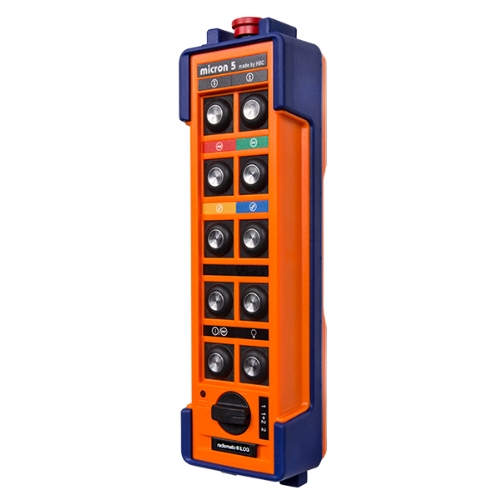
micron 5 batteries
Start with the original battery label, transmitter plate and charger code to identify a replacement for the equipment in use.
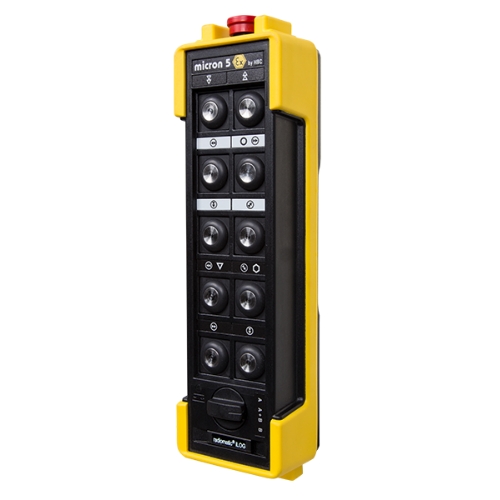
micron 5 Ex batteries
Provide the same identification details, plus the Ex marking and system requirements before selecting batteries or charging equipment.
Using spectrum A or another HBC model? Send the identification plate and original part information for review.
Mistakes to avoid before ordering spare parts
- Choosing by colour, housing or shape without checking the part number.
- Assuming similar model names mean the same battery or charger is compatible.
- Selecting a charger only because its connector fits, without checking the manual and requirements.
- Replacing a battery before sharing the symptoms and equipment details for review.
HBC-radiomatic batteries, spare parts and after-sales support
Profitto Co., Ltd. supports customers using HBC-radiomatic radio controls, from product advice and battery and spare-part sourcing through to after-sales support.
Contact us about batteries, chargers, push buttons, switches, housings and other components. Our team checks the model, part code and system details before quoting, with sourcing status and delivery time confirmed for each item.
Frequently asked questions
Can I inquire without a battery part number?
Send the transmitter, identification plate, battery and charger photos you have. Additional information or documentation may be needed before the item can be confirmed.
Can a micron 5 battery be used in micron 5 Ex?
Compatibility must be checked against the actual codes and system requirements. Model names and external appearance do not replace that check, especially for Ex equipment.
How do I request a price and delivery time?
Send the model, readable codes, equipment photos, quantity and required date. Our team will identify the item before confirming price and sourcing time. A similar-looking battery is not a reliable price comparison until the code is confirmed.
Summary
Finding the right HBC crane remote battery starts with the actual equipment: transmitter plate, battery label and charger code. Include the Ex marking for micron 5 Ex. Clear information helps identify the correct spare part and prepare a more precise quotation.
Need an HBC battery or spare part checked?
Contact Profitto Thailand with photos of the original equipment for battery, spare-part and after-sales inquiries.
Manufacturer references: service-request information · micron spare parts · micron 5 Ex. Replacements must be checked against the actual documentation and equipment number.